


 Log in










Access the login screen
When you enter the section “Log in or Create account”, you will see a screen like this:
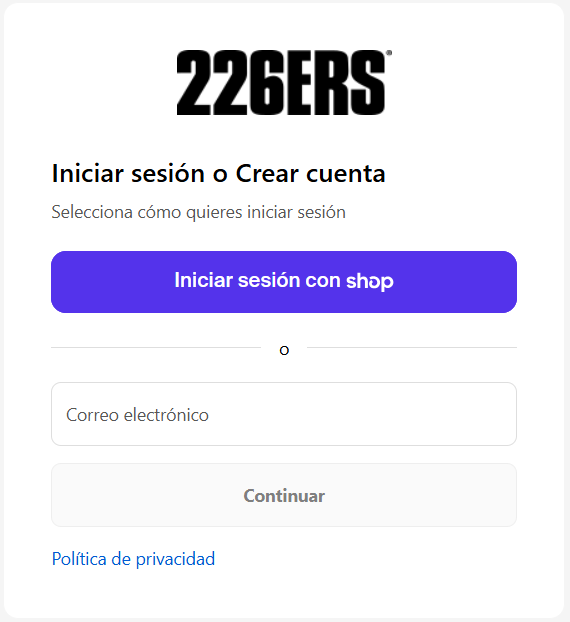
Log in with an already registered email
If you already have a customer account:
Write your email in the field.
- Click Continue.
- Shopify will send a verification code to your email.
- Open your email, copy the code and enter it on the store screen.
- Click on Confirm code.
You will directly access your account with your orders, addresses and saved data.
Create a new account
If your email is not registered yet:
- Enter your email and press Continue.
- Shopify will detect that there is no associated account and will give you the option to create an account.
- You will receive a code in your email to confirm your identity.
- Once you enter it, your account will be created automatically and you can now use it for your purchases.
Access with "Sign in with Shop"
You can also use the Shop app (from Shopify) to log in without entering email each time:
- Click on Sign in with Shop.
- The Shop app (or its web version) will open to validate your account.
- Once confirmed, you will return to the store logged in.
Recover access if you can't find the code
If you don't receive the code:
- Check your Spam or Promotions folder.
- Make sure you wrote the email correctly.
- Request a new code from the same login screen.